Goodbye Rawhiti School

Today I wrote this post to anounce that yesterday was my final day at Rawhiti School and that I will not return there next year. Because of this I will no longer (from this point) be posting any more content on this blog. I will however most likely continue to work on my most beloved Scratch projects (not posts) as they will atomaticaly update as I change or add things to them in the near future. Unfortunately though any other of my projects that are not a Scratch project will not be updated, for example Google Docs, Google Slides, ect. This is just because of how Google works, I’m sorry I can not change anything.

Hope you enjoy all the other Posts on this blog.
Have a good day.

Lights, Camera, Action

For the last couple of weeks my class has been creating movies about past protests in New Zealand. First we got split into two groups One Shot and Trailers. I was in the One Shot group but sadly wasn’t actually in the movie because I was away. Fortuantly though I did still get to help the creation of the movie and planning everything out in my group.

Here Is The Link If You Want To See It :
One Shot Movie

The Marrog! – Literacy

This week for literacy I have been reading poems written by other famous poets. One of the poems and personaly my favourite was called the Marrog, a poem about a very crazy creature hiding among people in a class. I also had to do three different create tasks about one of the poems but of course I chose the Marrog for all three. Firstly I drew a basic depiction of what I think the Marrog looks like using the poem in Google drawing. Secondly I created a fake news paper article of the Marrog but changing the authors purpose at the same time. And lastly I made an animation of the Maroog in its classroom along with all his or hers wierd classmates.

My Depiction Of The Marrog :

My Fake News Article Of The Maroog :
Link (Sorry I Coudn’t Embed It)

My Animation Of The Marrog :

Student Film Fest – Manaikalani Videos

This week for literacy I have been watching other peoples Manaikalani videos for 2024. I did this on a premade slide that my teachers made for me. In total I watched six seperate videos but only did a create task for three of them. On Monday I chose the story Sionge Sore Loser a video about a kid called Sionge who got abandoned because he wasn’t be kind to his other students in touch. Secondly, on Tuesday I chose The Missing Case of The Eletrical rubber. Honestly it’s a bit too chaotic to explain so I would recommend just watching it for your self. Lastly I chose to do a create task on a video called The Catch.

Here Is My Google Slide With All My Work :

My Mineraft Maze! – 2024

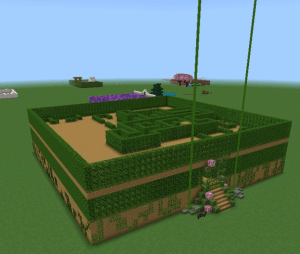
This term I have been creating my very own maze in Minecraft! We worked in groups to create them and I was in a group with two other students in my class. First we planned everything out, the theme, the blocks and three different rules that we had to follow to make the best maze possible. Fortuanly though, we got to choose the different rules that we had to follow. Instead though I actully chose four rules just for a little challenge. Anyways, the four I chose were, to hide dead ends, to add redstone activated doors to confuse the player, 3d space where I made our maze 3d and added two floors and lastly, open it up and add a courtyard with heaps of confusing corrodors.

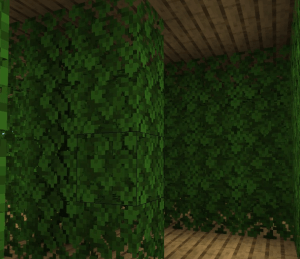
Our Maze was also pretty big and the whole perimetetre was 192 blocks! Our theme for our maze was overgrown and we added lots of different vegetation and plants because of this. It ranged from just basic leaves to towering vines and much more. Even though we used lots and lots of plants the main blocks that I used were oak leaves and basic oak planks but our entrance had all sorts of things. I do have to admit though I did just mainly use the variations of moss.

Overall I have to say it was just so fun but I especially enjoyed creating all the traps and features of our maze to trick the player. If I had to choose my second favourite thing about creating and making the maze it would honestly just designing the main layout of the leaves and path. On the other hand, my least favourite thing would most likely be having to build up all the walls of the maze because it was just so tedious, boring and not entertaing at all but still I would definitly reccamend having a go of making a maze in minecraft or even just drawing one on paper as a plan.

I also took some photos which you can view here :


Math – Ratios

Today for math I learnt about ratios. Ratios are something that you can use in math to show well the ratio of two seperate numbers. For Example if a ratio for people to ants was 1:3 for every 1 person there would be 3 ants. I also wrote 3 different ratio questions for you to try and figure out.

Here are the questions :

  • If the ratio for birds and lions is 10:2 and there are 20 birds how many lions are there?
  • If the ratio for tigers and fox’s is 5:25 and there are 100 fox’s how many tigers are there?
  • If the ratio for dogs and cats is 1:1 for every dog how many cats would there be?


Scratch – My Flappy Bee Game

Today for my literacy I continued on from last weeks “Bees!” T-shaped literacy, I created a bee game where it’s basically just Flappy Bird but with a couple of changes. Also my game is quite bad so don’t go in it expecting too much.

My Horrible But Somewhat Playable Flappy Bee Game :

Scratch – My Basic Platformer

For the last couple of months I have been creating a basic platformer using Scratch. In this game there are certain collectables that you can well, collect and each of them do a different thing. From apples to teleportation watermelons there will slowly be more and more as I update the game.

List of Most Collectables and what they do :
Apple – Increases your apple count by one.
Golden Apple – Increases your life count by one.
Key – Can open the corresponding coloured door.
Green Flag – Sets a checkpoint where you collected it.
Gold Flag – Sets a checkpoint as well as resets your lives to 3.
Teleport Watermelon – Teleports you to a certain location.

Basic Controls :
Arrow keys or WASD to move left, right and jump.
Top arrow key to wall jump while sliding on a wall.
Tap and hold the top arrow key or W to jump higher.

Here’s my Game :

Link To My Game

If you haven’t used Scratch before to code your own game I definitely recommend it.
Have You Used Scratch Before?

Literacy – Bees!

This week for literacy I have been learning about honeybees. First I watched a video all about honeybees and their hives. After that I filled in some questions related to the video. I also created a Google drawing of the anatomy of a bee. Then I made a fake letter as a bee to the Queen bee.

My Anatomy of a Bee :

My Letter to the Queen Bee :

Math – Sports Graph

This week for math me and my buddy gathered data about our corresponding question. Our question was how Long can you hold a Plank? First we sorted our data using a Stem n Leaf chart. After that we created a paper bar graph in each of our books to understand how to use our sorted data and put it into our graphs that we create. Secondly we put our data into a Google sheet and then highlighted it, clicked create chart and it automatically created any type of graph or chart we would like. We created a Pie and Scatter chart but you can choose any. Each of them showed our data but the scatter chart had a X and Y axis. The X axis is the horizontal one and the Y one is vertical.

My Graphs :

My Book/Bar Graph :